
Guide
Make your first series
Follow one example from an empty app to a published episode: Cerita Kampung, a channel of village stories, and its series Village Mysteries. Every idea domotion is built on shows up once, at the step where you need it.
The example: Cerita Kampung › Village Mysteries · Toon Story style · Village Mystery format
Watch it first
Under two minutes, no sound needed: the eight steps below in the real app, explained on screen.
Read the video as text
- 0:00domotion guide Make your first series One example, start to finish: Cerita Kampung › Village Mysteries
- 0:041 / 8 · Create a channel
- 0:06A channel is one audience and one voice. Its instructions reach every video made in it.
- 0:132 / 8 · Meet the Manager
- 0:16The Manager is the channel’s producer: one chat for planning and decisions.
- 0:223 / 8 · Series = Format + Style
- 0:25Format is what happens. Style is how it looks. A series picks one of each.
- 0:334 / 8 · Brainstorm the world
- 0:36The world is the place every episode comes back to. The draft changes with each answer.
- 0:495 / 8 · Cast your regulars
- 0:51The cast is the series’ regulars, drawn once. They live in its world, so every episode shows the same faces.
- 0:596 / 8 · Ideas, scripts and fact checks
- 1:01Every episode starts as a card on the Ideas board. Its script is reviewed and fact checked first.
- 1:167 / 8 · The crew makes the video
- 1:19The crew is the team for one video. I’ll review stops it at each decision.
- 1:22Time skip · 13 min
- 1:28Time skip · 3 min
- 1:32Time skip · 21 min
- 1:35Time skip · 20 min
- 1:35The finished episode
- 1:418 / 8 · Finals → Publish
- 1:43A final is the finished file. Publish is where it goes out, and how it did.
- 1:52Make yours Your first series is a channel, a format, a style and an idea away. domotion.ai/learn
How domotion thinks
A channel holds series, a series holds episodes, and each episode goes from an idea to a published post. Two helpers work at different sizes: the Manager looks after the whole channel, the crew makes one video.
Channel
Cerita Kampung
Manager · the channel’s producer: plans with you in a chat
Series
Village Mysteries
Format
Village Mystery
Style
Toon Story
World
Kampung Sumberwangi
Cast
Dimas, Sari, Tole, Mbah Sri, Pak Rusdi
Each episode
1 · Idea
a card with its script
2 · Crew
the team for one video
3 · Final
the finished file
4 · Publish
posted and measured
The words, in plain language
- Channel
- One audience and one voice, like your YouTube channel or your brand. Its instructions reach every video made in it.
- Manager
- The channel’s producer, in a chat beside your videos. It plans with you, writes ideas and scripts, and brings bigger changes as cards you apply or dismiss.
- Series
- A run of episodes inside a channel that start with the same settings. Village Mysteries is one series of Cerita Kampung.
- Format
- What happens in an episode: its beats, hook, narrator, length and pace. Village Mystery is a habit that looks impossible, a doubter, a test and a true reason.
- Style
- What an episode looks like: the drawing, colours, type and motion. Toon Story is cartoon people in outlined 3D toon sets, filmed by one travelling camera.
- World
- The place your episodes come back to: setting, look, places, characters, props and rules. It keeps the village the same village in every video.
- Cast
- The series’ regulars, who live in its world. The crew draws each one once and keeps them in the Library, so they look the same in every episode.
- Ideas
- The board where every episode starts as a card. Its script is written, reviewed and fact checked there, before anything is made.
- Crew
- The AI team that makes one video: Producer, Director, Writer, Voice, Animator, 3D artist, Render, QA and Fact-checker. You talk to it in Studio.
- Studio
- One video’s workspace: the crew’s chat on the left, the preview and the timeline on the right. Point at a moment and say what to change.
- Workbench
- Where one drawing or one style is made with the crew, opened from the Library. Use it to redraw a prop, draw a place or tune a style before videos use it.
- Autopilot or I’ll review
- Autopilot lets the crew finish a video on its own. I’ll review makes it stop at the look check or rough cut and at fact-check fixes until you approve.
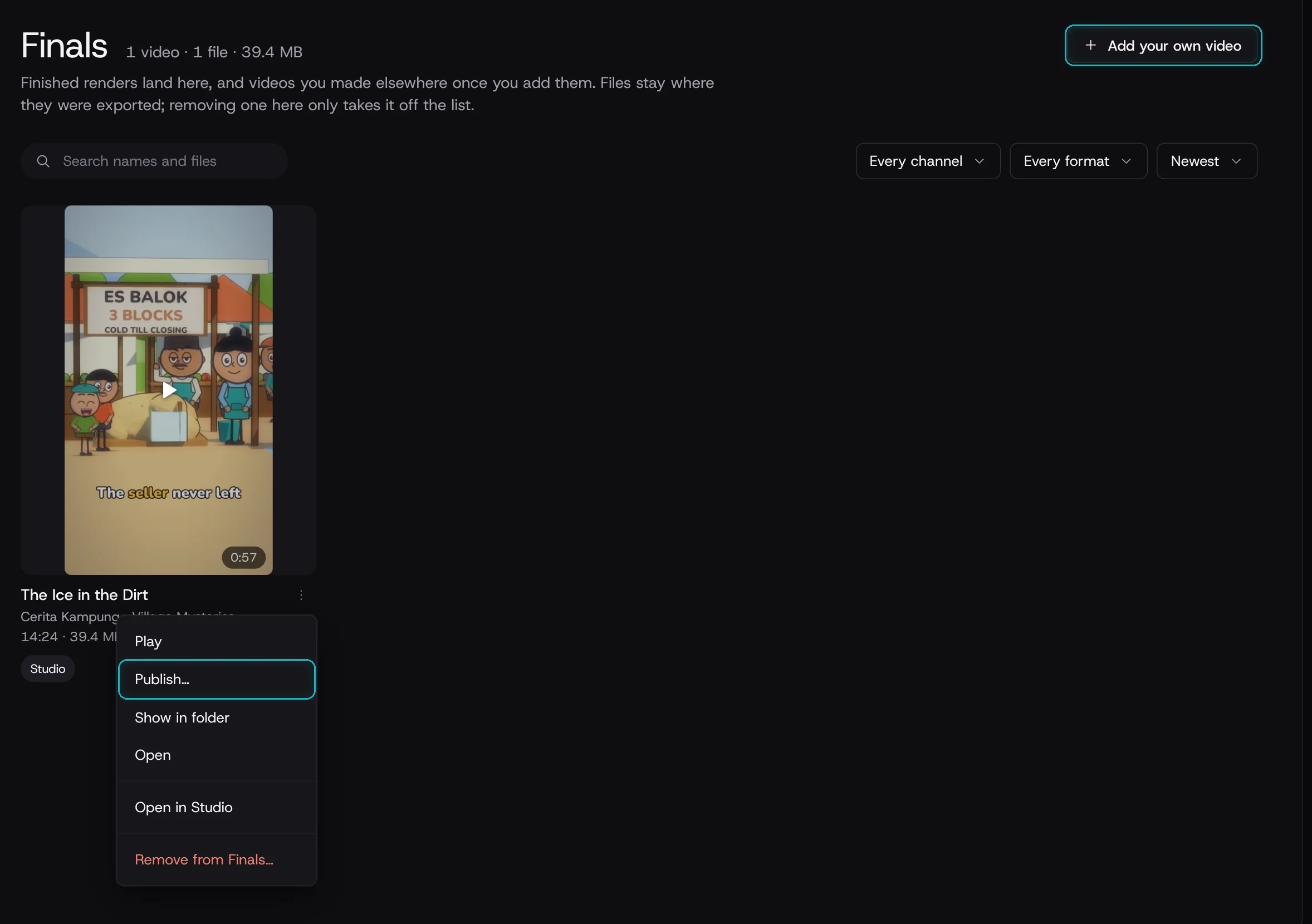
- Finals
- Every finished video file in one list, ready to publish. You can add your own video made elsewhere too.
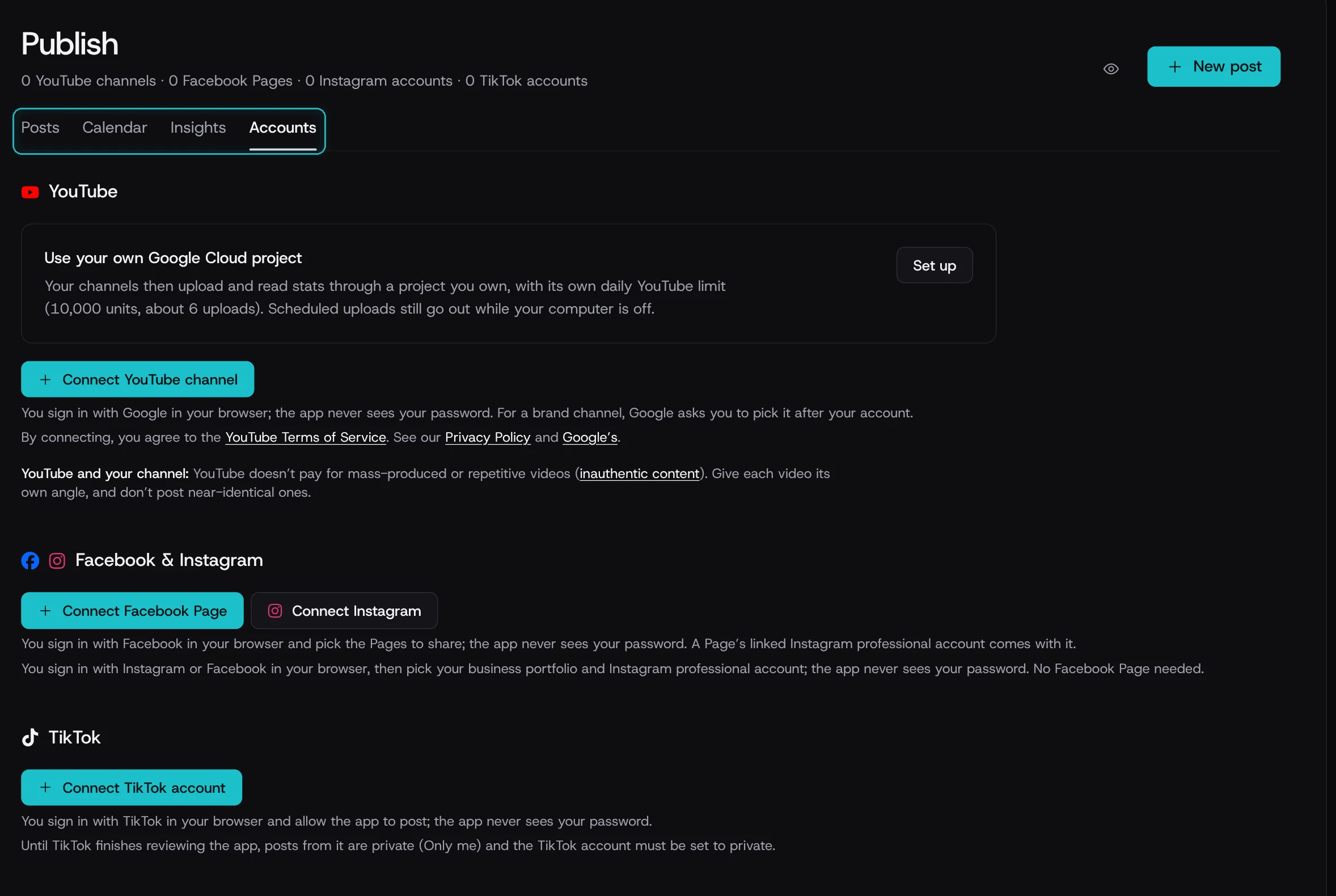
- Publish
- Your connected accounts, a calendar and the stats that come back. Each final gets its own time on each platform.
Format or style?
A series picks one of each. Change the format and the story changes shape; change the style and the same story is drawn another way.
Format: what happens
Village Mystery
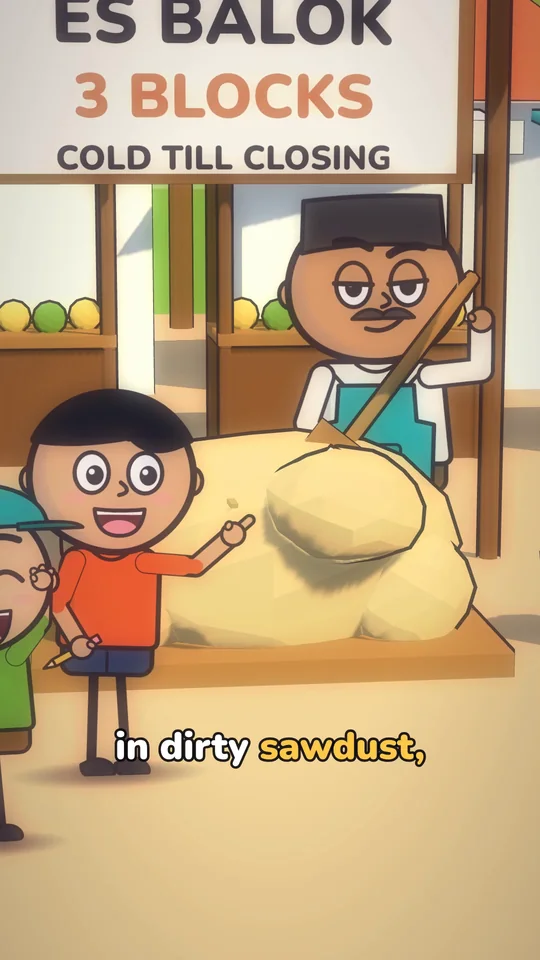
- A paradox with a number: 3 blocks of ice buried in dirty sawdust, yet his ice lasts longest
- A newcomer doubts it: Uncle Bayu says a shiny tarp is better
- A test that costs something: by two o’clock the tarp block sits in a puddle
- The reason, in two plain sentences: sawdust is full of tiny pockets of air, and air keeps the heat out
- A callback to line 1: the chalkboard reads SAWDUST 1, TARP 0
Style: how it looks
Toon Story
Cartoon people in outlined 3D toon sets, one travelling camera, word-timed captions in a rounded font.
Walkthrough: one series, start to finish
Eight steps, in the order you meet them. Each one says what to click, what happens and the idea behind it. The pictures are the real app.
Step 1
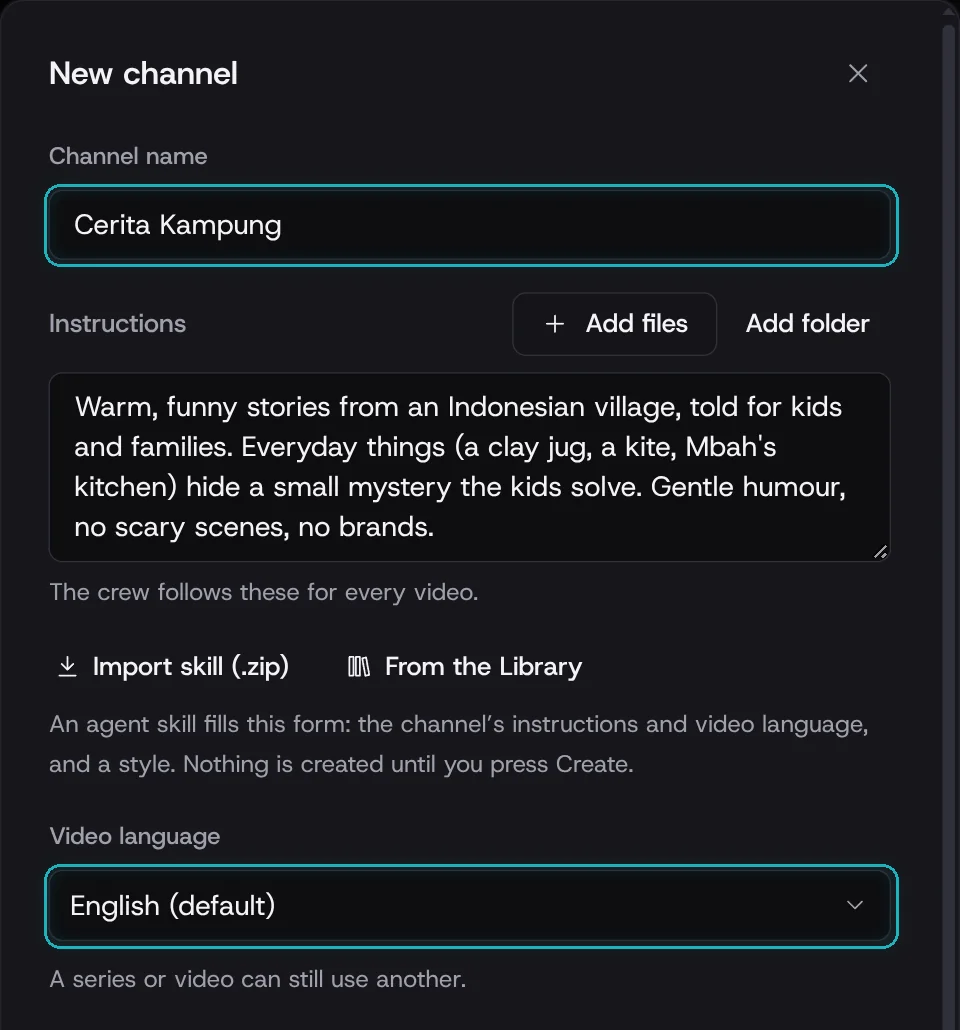
Create a channel
- Click
- New channel at the bottom of the left rail. Name it Cerita Kampung, write a few lines of Instructions (who it’s for, the tone, what never to do), choose the Video language, then Create.
- What happens
- The channel appears in the rail with its own Manager, Ideas board and posts. Its instructions go to every video made in it.
- The idea
- A channel is one audience and one voice.
Step 2
Meet the Manager
- Click
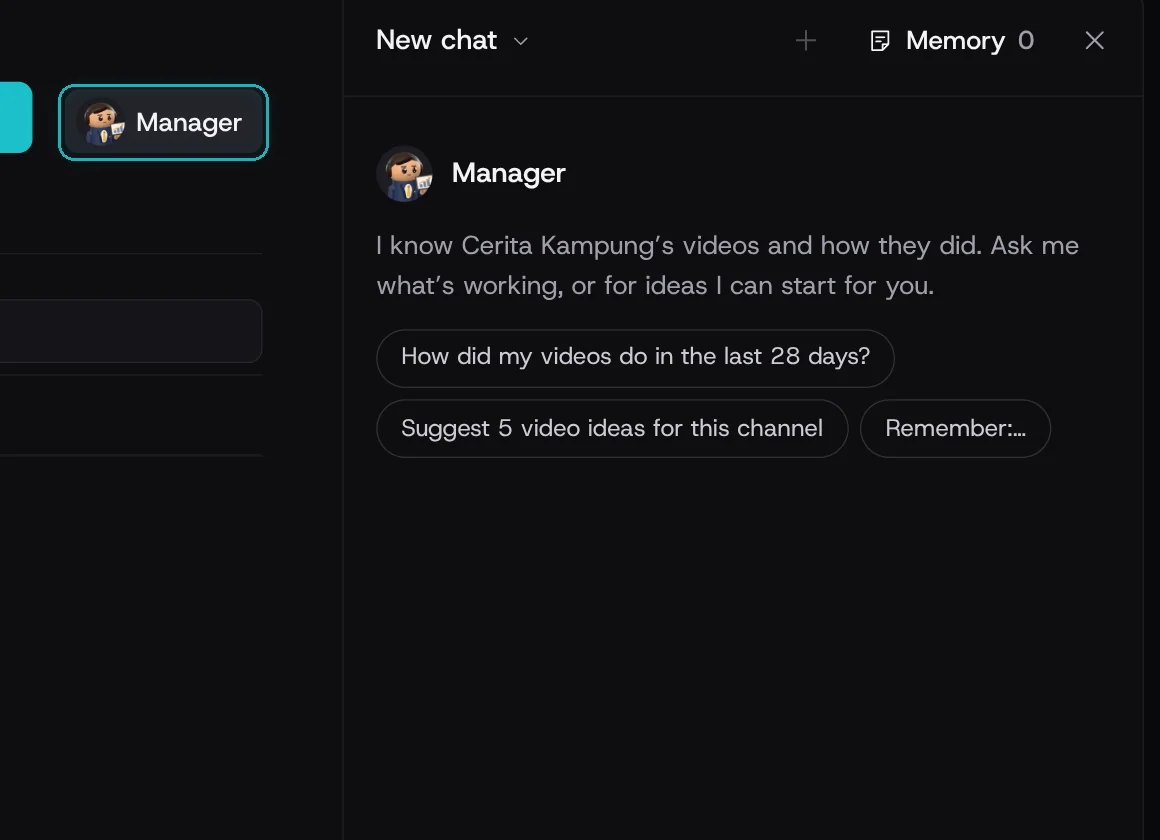
- Open Cerita Kampung and press Manager at the top right.
- What happens
- A chat opens beside the channel. The Manager knows the channel’s instructions, its videos and how they did. Ask it what’s working, ask for ideas, or plan the next series with it.
- The idea
- The Manager is the channel’s producer: one chat for planning and decisions.
Step 3
Create a series: pick a format and a style
- Click
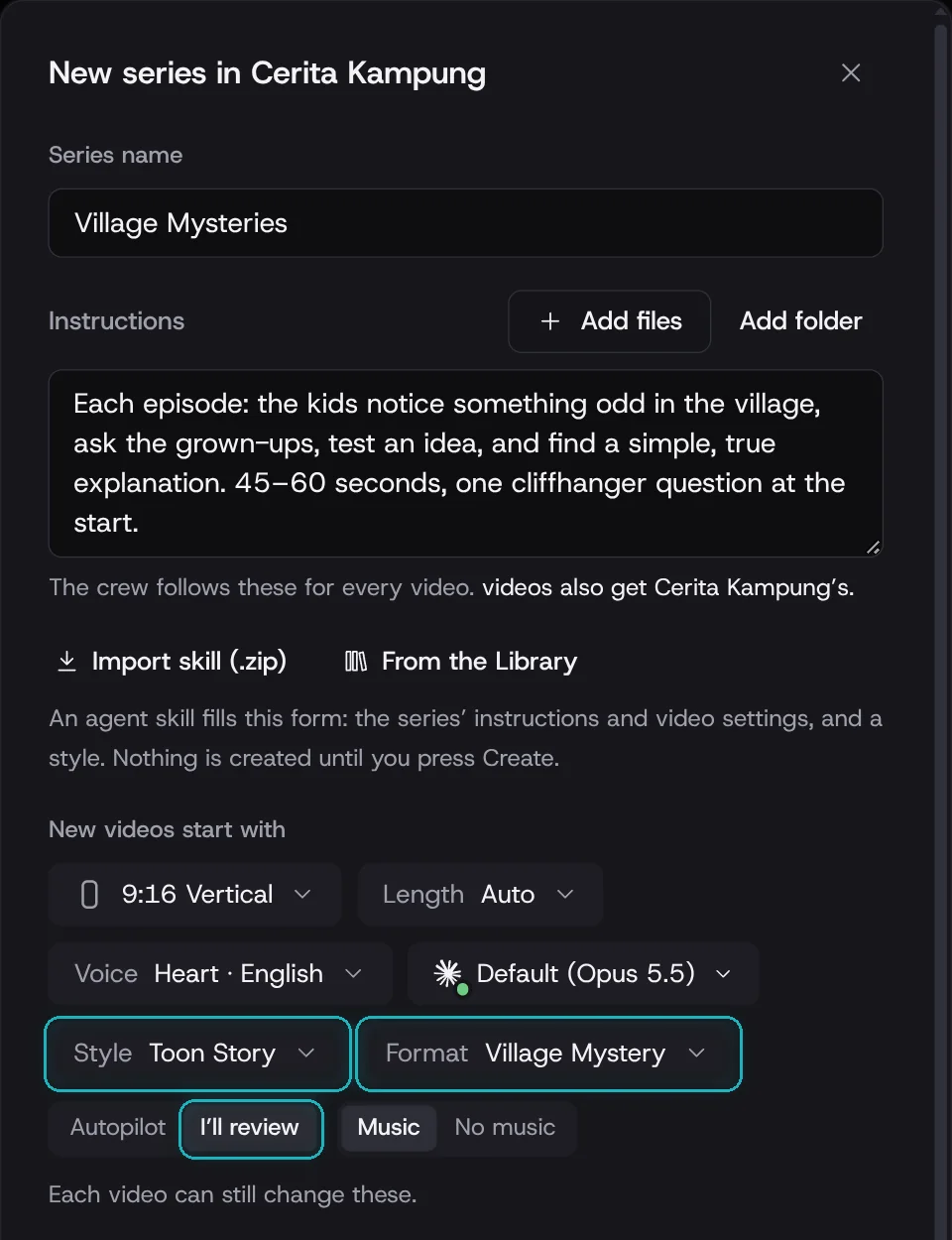
- The channel’s ⋯ menu › Add a series. Name it Village Mysteries. Under New videos start with, choose Style: Toon Story and Format: Village Mystery, pick I’ll review, then Create.
- What happens
- Every new video in the series starts with these settings: ratio, length, voice, AI, style, format and how much you review. A single video can still change them.
- The idea
- Format is what happens; style is what it looks like. A series picks one of each.
Step 4
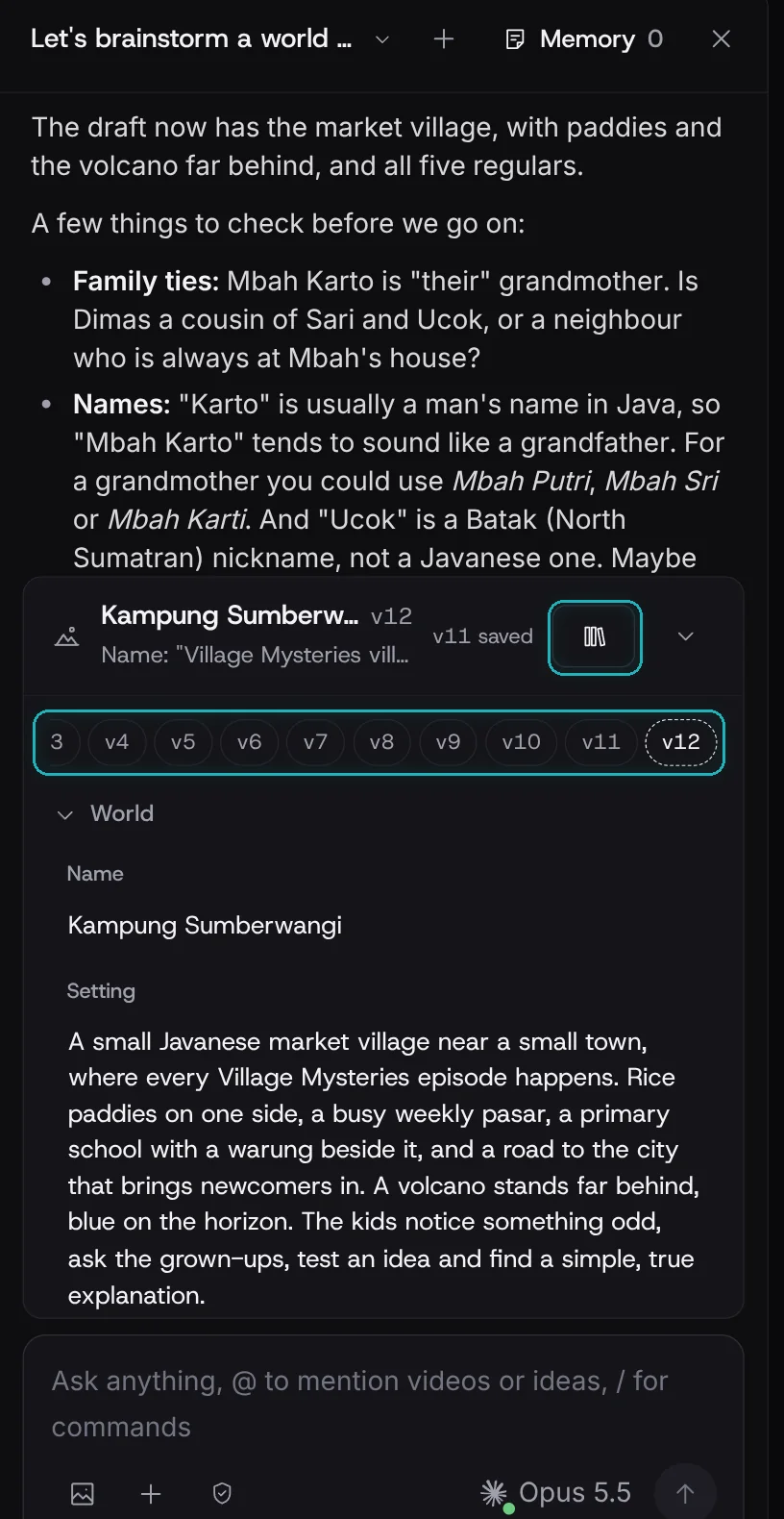
Brainstorm the world with the Manager
- Click
- Select the series and tell the Manager: “Let’s brainstorm a world for Village Mysteries.” Answer its questions; it offers choices instead of guessing.
- What happens
- A world draft opens above the chat box and changes with every answer: setting, look, places, characters, props and rules. Each change is a version you can compare or go back to, and you can edit any field yourself. When it’s ready, the Manager suggests saving; Review and save… lets you choose which series it belongs to.
- The idea
- A world is the place episodes come back to, so every video shows the same village.
Step 5
Cast your regulars
- Click
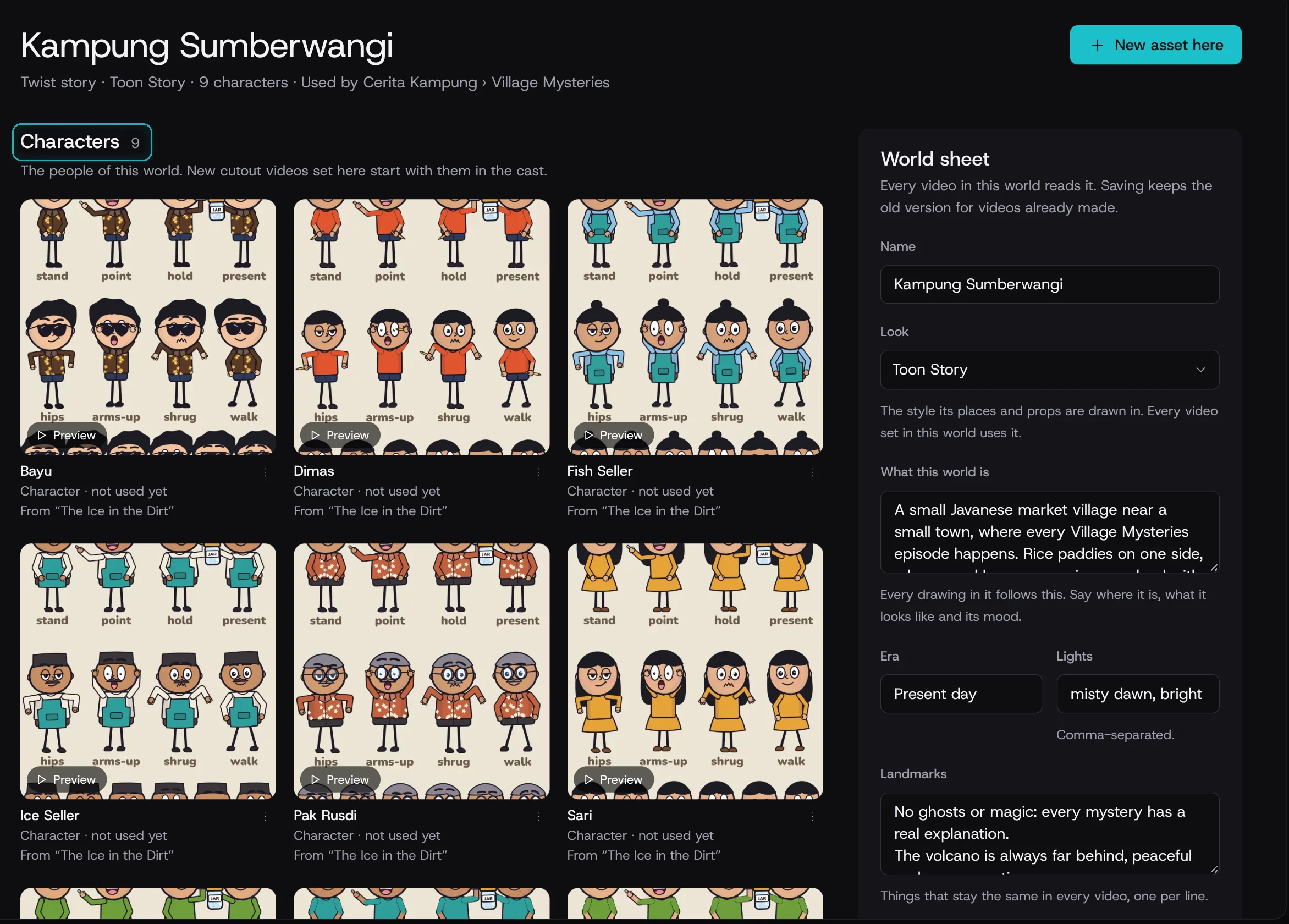
- Ask the Manager to set up the cast. Before the first episode it writes Dimas, Sari, Tole, Mbah Sri and Pak Rusdi into the series’ instructions as a card: press Apply. After the first video, open Library › Kampung Sumberwangi to meet them.
- What happens
- Every script is written with your regulars. The first episode draws each of them once, with a sheet of poses, and keeps them in the world, so the next episodes reuse the same faces. With the paper cut-out styles you can also pin characters in the series’ Cast so they appear in every episode.
- The idea
- The cast is the series’ regulars, drawn once and kept in its world.
Step 6
Fill the Ideas board and check the facts
- Click
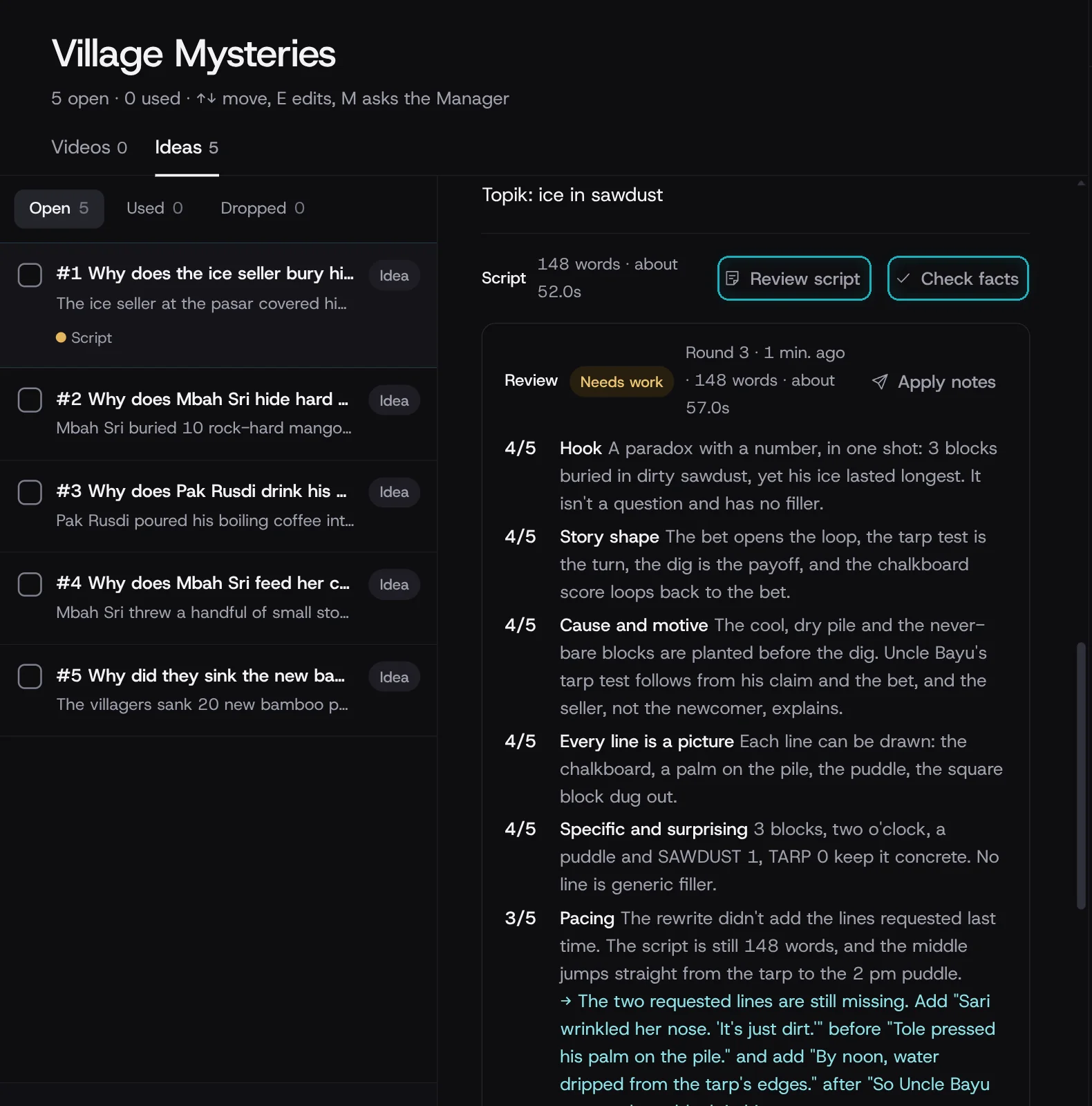
- Ask the Manager for five episode ideas, open the Ideas tab, select one and press Write script. Review script and Check facts run on the card; when it reads right, set its status to Picked.
- What happens
- The card gets a script, a review that scores the hook, story, pictures, pacing and voice with notes it can apply, and a fact check of every claim. Nothing is made yet.
- The idea
- Ideas is the script board: production speaks the picked script word for word.
Step 7
Send it to the crew and steer it in Studio
- Click
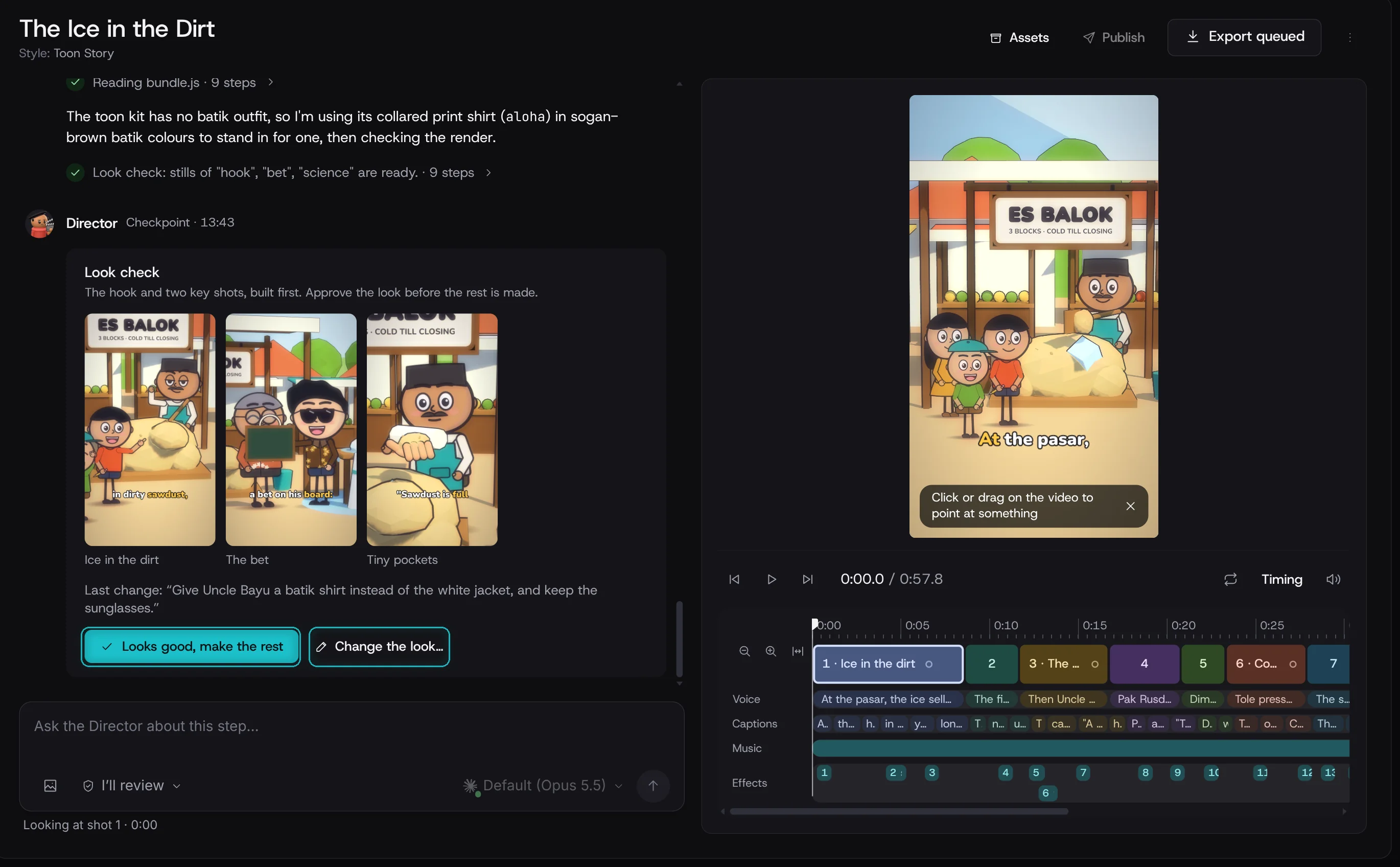
- Send 1 picked to crew, confirm with Send to crew, then open the video from the Videos tab.
- What happens
- Studio opens: the crew’s chat on the left, the preview and the timeline on the right. The Writer splits the script into shots, Voice records it and the Animator builds the scenes. With I’ll review, the crew stops at the look check: press Looks good, make the rest, or Change the look… and say what. To change anything else, type in the box at the bottom, or click the video to point at a spot first.
- The idea
- The crew is the team for one video. Autopilot lets it finish alone; I’ll review stops at each decision.
Step 8
From Finals to Publish
- Click
- When the render is done, open Finals in the rail and choose Publish… in the episode’s ⋯ menu. For a clip made elsewhere, press Add your own video.
- What happens
- Publish › Accounts connects YouTube, Facebook, Instagram and TikTok once. Each final then gets a time per platform; the Calendar shows what goes out when, and Insights brings views and watch time back.
- The idea
- A final is a finished file; Publish is where it goes out and how it did.
Questions
Which AI do I need?
One that writes: Claude Code with a Claude subscription, Codex with a ChatGPT plan, Antigravity with a Google AI plan, or a provider such as OpenRouter or your own endpoint. Choose it in Settings › AI; each video can pick another.
What do tokens pay for?
Voices only: Gemini and ElevenLabs voices without your own API key. Kokoro voices are free and run on your computer (English), and the writing runs on your own AI plan.
Can I use my own sounds and fonts?
Yes: Library › My library takes your sound effects, music, fonts and brand kit. You tag each sound yourself; a channel can prefer your sounds or use only your music, and your fonts appear in the style builder.
How do I move to a new computer?
Settings › Your data › Export everything puts your videos, library, channels, Manager chats and settings in one file (API keys too if you lock them with a password). On the new computer, install domotion, sign in and use Import from another computer. Your licence, tokens and connected accounts come back with your sign-in.
The Mac won’t open domotion the first time.
That’s expected: the Mac app isn’t notarized by Apple yet, so the first open needs one extra step in System Settings. Steps for Mac
Make yours
Your first series is a channel, a format, a style and an idea away.